






Introduction
A compliance dashboard is a visual management tool that consolidates an organization's compliance obligations, control statuses, and audit findings into a single real-time interface. It applies to any organization subject to regulatory requirements, internal policies, or third-party compliance obligations. The dashboard governs how compliance data is monitored, reported, and escalated across business units, enabling proactive management of deadlines, control gaps, and regulatory changes.
In a world where regulations, audit cycles, and compliance obligations keep growing, organizations face mounting pressure to keep pace. According to PwC's Global Compliance Survey 2025, 85% of organizations say compliance requirements have become more complex over the past three years, with half of all respondents navigating different laws and regulations across multiple jurisdictions. A well-designed compliance dashboard addresses both pressures directly, bringing together deadlines, control status, audit issues, and regulatory updates into a single view across departments and geographies.
This article provides a detailed overview of the compliance dashboard and its various aspects, including key features and elements, optimum update frequency, benefits, and more.
Key Takeaways
- A compliance dashboard is a visual tool that displays real-time data on an organization’s compliance status, highlighting key metrics, trends, and potential areas of risk. It helps in monitoring and managing compliance efforts a lot more efficiently.
- Key components of an effective compliance dashboard include overall compliance status, compliance status by organization, compliance status by regulation, control environment, compliance issues, etc.
- Color coding, drill-down capabilities, and the ability to extract, configure, and share data easily are some of the key features of compliance dashboards that organizations should look for when considering a compliance management solution.
- Compliance dashboards enhance decision-making, improve compliance tracking, increase transparency and accountability, and offer real-time monitoring and alerts, ultimately ensuring proactive compliance management and organizational resilience.
What is a Compliance Dashboard?
A compliance dashboard is a centralized digital interface designed to track, manage, and report an organization's compliance status. It integrates data from various sources to present a cohesive view of compliance activities, deadlines, and metrics.
Compliance dashboards are invaluable for compliance officers, auditors, and decision-makers who need real-time insights into their organization's adherence to regulations and standards. Essentially, a compliance dashboard transforms complex compliance data into actionable intelligence, enabling organizations to streamline their compliance processes, mitigate risks, and ensure that they are always one step ahead of regulatory requirements.
Different Types of Compliance Dashboards
Compliance dashboards come in several distinct types, each designed to address a specific domain of regulatory or operational risk. The right type for an organization depends on its industry, regulatory obligations, and the audience that will use the dashboard most frequently:
1. Regulatory Compliance Dashboards
- Designed to track an organization’s compliance with specific regulatory requirements such as GDPR, HIPAA, PCI-DSS, or SOX.
- Displays real-time compliance status, pending actions, and potential violations.
- Helps organizations stay updated on evolving regulatory requirements.
2. Risk and Audit Compliance Dashboards
- Monitors risk exposure, mitigation efforts, and internal/external audit findings.
- Provides insights into identified risks, control effectiveness, and compliance gaps.
- Helps organizations take proactive steps to address audit recommendations.
3. Policy and Training Compliance Dashboards
- Tracks employee training completion rates, policy acknowledgments, and adherence to company guidelines.
- Ensures that all employees have completed required training on compliance topics such as cybersecurity, data protection, and workplace ethics.
- Flags overdue training sessions and compliance violations.
4. Vendor and Third-Party Compliance Dashboards
- Assesses the compliance status of third-party vendors, contractors, and business partners.
- Evaluates vendor certifications, risk scores, and adherence to contract terms.
- Reduces supply chain risks by ensuring third parties meet compliance standards.
5. Data Privacy and Security Compliance Dashboards
- Monitors data protection measures, security incidents, and adherence to privacy laws.
- Displays key metrics such as data breaches, unauthorized access attempts, and encryption compliance.
- Helps organizations strengthen cybersecurity and ensure data privacy compliance.
6. Financial Compliance Dashboards
- Tracks adherence to financial regulations, fraud detection, and transaction monitoring.
- Provides visibility into compliance with tax laws, anti-money laundering (AML) policies, and financial reporting standards.
- Ensures transparency in financial operations and reduces regulatory risks.
| Dashboard Type | Primary Purpose | Typical Users | Key Metrics Shown |
| Regulatory Compliance | Track adherence to specific regulations (GDPR, HIPAA, SOX) | CCO, Compliance team | Obligation coverage, deadline status, audit results |
| IT / Cyber Compliance | Monitor IT controls and security posture | CISO, IT security team | Control test results, vulnerability status, patch compliance |
| ESG Compliance | Track ESG reporting obligations and performance | CSO, CFO | Carbon metrics, supply chain standards, reporting deadlines |
| Healthcare Compliance | Monitor HIPAA, HITECH, accreditation requirements | Privacy officer, Compliance officer | PHI access controls, breach status, accreditation scores |
| Financial Services | Track Basel, DORA, MAS, BCBS requirements | CRO, CCO | Capital ratios, operational risk events, regulatory submissions |
| Third-Party / Vendor | Monitor vendor compliance status | TPRM team | Vendor assessment scores, contract status, risk ratings |
What Do Compliance Dashboards Do?
Compliance dashboards serve as a central hub for monitoring and managing regulatory adherence. Their primary functions include:
1. Real-Time Compliance Monitoring
- Provides an overview of an organization’s compliance status, highlighting areas of non-compliance.
- Offers live updates on regulatory changes and compliance requirements.
2. Risk Identification and Mitigation
- Identifies potential risks and compliance gaps before they become major issues.
- Enables organizations to take proactive measures to mitigate risks.
3. Automated Reporting and Documentation
- Generates compliance reports for audits, stakeholders, and regulatory bodies.
- Ensures all compliance activities are well-documented for transparency.
4. Performance Metrics and Insights
- Tracks key performance indicators (KPIs) related to compliance, such as training completion rates and policy adherence.
- Helps organizations make data-driven decisions to improve compliance efforts.
5. Enhanced Accountability and Governance
- Assigns responsibilities to teams and individuals for compliance-related tasks.
- Ensures clear accountability for compliance initiatives.
By using compliance dashboards, businesses can streamline compliance management, reduce regulatory risks, and maintain a strong compliance culture.
What Should Be in Your Compliance Dashboards?
To ensure your compliance dashboard is effective, it should encompass several key components. Here are some critical elements to consider:
Overall Compliance Status:
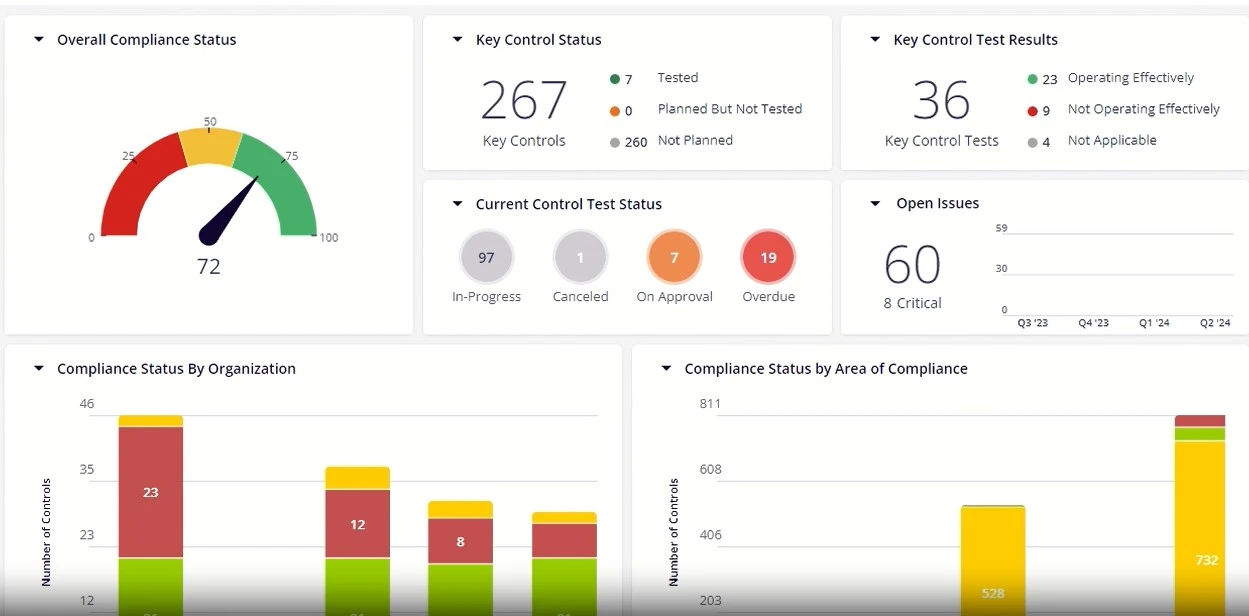
This section should display the overall compliance posture of the organization. It could be a compliance score calculated based on the effectiveness of controls, control test results, compliance with all relevant regulations and standards, open issues, etc. The score provides a clear snapshot of the organization’s compliance status - whether it is high, average, or low.
Control Environment:
A robust control environment is essential for a strong compliance posture. This section on the compliance dashboard should display details such as the total number of controls; the number of controls tested, planned but not tested, and not planned; and key control test results, including the total number of key control tests conducted so far, controls operating effectively, not operating effectively, etc. Such information helps in identifying control weaknesses and gaps as well as prioritizing efforts and resources to address them.
Compliance Snapshot:
This section provides a snapshot of compliance status by organization, including particular division, department, etc.; by area of compliance, which displays the compliance status with respect to relevant regulations such as PCI DSS, HIPAA, ISO 27001-2013, etc. This information helps to pinpoint areas of non-compliance at a quick glance for prompt action.
Compliance Issues:
This section provides information on all compliance-related issues. These could be categorized by rating (critical, high, medium, and low), status (open, closed, pending approval), and type (control failure, data breach, deviation from policy, IT control failure).
Performance Metrics:
Key performance indicators (KPIs) related to compliance should be displayed. Metrics such as the number of compliance incidents, resolution times, and adherence rates provide valuable insights into your compliance posture.
Audit Trails and Logs:
Maintaining detailed audit trails and logs within your dashboard ensures transparency and accountability. This helps in tracing the history of compliance actions, making it easier to demonstrate compliance during audits.
Notifications and Alerts:
These should be configurable to notify relevant stakeholders about upcoming deadlines, changes in regulations, or emerging compliance issues.
Real-Time Monitoring:
Real-time data integration allows you to continuously monitor compliance activities and status. This helps in identifying and addressing issues as they arise, rather than after they have escalated.
| Metric Category | What to Measure | Why It Matters |
| Obligation Status | % obligations mapped to controls; % with upcoming deadlines | Prevent missed compliance deadlines |
| Control Effectiveness | % controls tested; pass rate; overdue tests | Identify control weaknesses before regulators do |
| Audit Status | Open findings; average days to remediation | Demonstrate active remediation to auditors |
| Regulatory Changes | New regulations received; assessed; implemented | Track regulatory horizon scanning effectiveness |
| Policy Compliance | % policies reviewed on schedule; attestation rates | Ensure organisational policy awareness |
| Issue Management | Open issues; age by severity distribution | Ensure timely remediation of compliance gaps |
Key Features of an Effective Compliance Dashboard
Key features of an effective compliance dashboard include color coding for quick identification of urgent issues, drill-down capabilities for accessing detailed data, and easy extraction for swift report generation. The dashboard should also be easily configurable to meet specific user needs and shareable to ensure prompt communication and decision-making among stakeholders.
Here are some important features of a compliance dashboard:
Color Coding
This feature helps users quickly identify areas that require immediate attention, such as non-compliant activities, pending issues, or control effective. A well-designed color scheme can distinguish between various compliance metrics, making it easier for users to interpret data at a glance without experiencing information overload.
Drill-Down Capabilities
Users should be able to click on high-level metrics to access more detailed information, such as underlying data, specific compliance activities, and related documentation. This functionality enables deeper insights and facilitates root cause analysis, helping compliance teams to identify and resolve issues more efficiently.
Easily Extractable
Whether it's for presenting to the Board, undergoing audits, or sharing with external stakeholders, the ability to generate comprehensive reports swiftly is crucial. Export options like PDF, Excel, or other formats enable users to compile, customize, and share detailed reports effortlessly, ensuring transparency and accountability.
Easily Configurable
Users should be able to configure the dashboard to meet their specific needs, whether that involves switching from pie charts to bar graphs or adjusting color schemes. This personalization allows for more tailored data visualization, catering to different preferences and requirements, which enhances user experience and data comprehension.
Easily Shareable
An effective compliance dashboard should offer multiple sharing options, such as direct email attachments or secure links, ensuring that relevant stakeholders can access critical compliance information promptly, fostering better communication and quicker decision-making.
How to Build a Compliance Dashboard
Building an effective compliance dashboard requires deliberate planning across data, governance, and user design dimensions, and the decisions made at each step directly determine whether the dashboard delivers actionable insight or becomes another underused reporting tool. Here are the steps to follow to build an effective compliance dashboard:
Step 1: Define Your Compliance Universe: Begin by mapping every applicable regulation, internal policy, and industry standard to the business units and processes they govern. This exercise establishes the data foundation your dashboard will surface and prevents the common mistake of building a dashboard around the metrics that are easiest to collect rather than the obligations that matter most. Organizations operating across multiple jurisdictions should complete this mapping at the local level first, then consolidate into a single compliance universe that reflects the full scope of the organization's obligations.
Step 2: Identify Your Primary Dashboard Users: Board-level users, compliance managers, and operational teams require fundamentally different views of the same underlying data. A board member needs a single compliance score and trend line; a compliance manager needs control test results and overdue action counts; a front-line team lead needs to know which policies require attestation by the end of the week. Design each view separately from the outset, and resist the temptation to build a single dashboard that tries to serve all audiences simultaneously, as this typically results in a display too complex for strategic use and too high-level for operational action.
Step 3: Connect Your Data Sources: Integrate your obligation tracking system, control testing results, audit findings, regulatory change feeds, and policy management tools into a unified data layer that feeds the dashboard automatically. Manual data entry at this stage introduces errors and creates a false picture of compliance status. Organizations using a GRC platform can typically configure these integrations directly within the platform; those working across disconnected systems will need to prioritize which data sources are most critical and build toward full integration incrementally.
Step 4: Define Key Metrics and Alert Thresholds: For each compliance domain, define the specific metrics that will appear on the dashboard and the thresholds that trigger escalation. A control effectiveness rate dropping below 85% might trigger a yellow status; below 70% might trigger red and an automatic notification to the compliance manager. Defining these thresholds in advance removes subjectivity from compliance status assessments and ensures that the dashboard drives consistent responses to consistent conditions across the organization.
Step 5: Establish Update Cadence and Governance: Determine how frequently each metric updates, who owns each metric, and what the escalation process is when a threshold is breached. Without clear ownership, dashboards degrade over time as data becomes stale and no one takes responsibility for investigating alerts. Assign a named owner to each compliance domain reflected in the dashboard, establish a regular review cadence at the operational and executive level, and build a process for updating the dashboard's scope as new regulations come into force or business units are added.
How Often Should You Update Compliance Dashboards?
The frequency with which compliance dashboards should be updated is a pivotal concern for organizations. While the exact update interval may vary based on specific company requirements and industry standards, the prevailing consensus is that companies need real-time visibility into their compliance status.
Companies must transition to a more dynamic approach that leverages technology-based solutions to ensure real-time updates. Advanced solutions like those offered by MetricStream provide comprehensive, real-time compliance dashboards that aggregate data from various sources and present it in an easily understandable format. These platforms utilize automated workflows and well-defined processes to continuously monitor compliance metrics, flag potential issues, and generate actionable insights.
The frequency of updates depends on various factors, including the nature of the business, the regulatory environment, and the specific needs of the organization.
For highly regulated industries such as finance or healthcare, real-time updates are crucial for immediate detection of compliance breaches and prompt corrective actions. Most organizations find that weekly updates strike a good balance, ensuring the dashboard reflects recent activities and trends. Monthly reviews provide a broader perspective on compliance performance, allowing for pattern detection and strategic adjustments. Quarterly assessments are suitable for stable compliance environments, offering comprehensive reviews to ensure long-term compliance objectives are met.
For example, a multi-site healthcare provider uses its compliance dashboard to manage obligations under HIPAA, HITECH, and its accreditation requirements across hospital, outpatient, and administrative functions.
The dashboard tracks protected health information access controls, breach notification timelines, and staff training completion rates in a single interface, with color-coded status indicators allowing the privacy officer to identify at a glance which sites are at risk of a compliance gap. When an access control failure is detected, the dashboard automatically opens an issue, assigns it to the site compliance lead, and tracks remediation progress against a defined SLA.
Quarterly accreditation reviews, which previously required weeks of manual evidence compilation, are now supported by a pre-built report template that pulls current control status, audit findings, and policy attestation rates directly from the dashboard.
To learn how MetricStream Compliance Management can help you stay on top of your compliance function with a robust dashboard, request a personalized demo today.
Benefits of a Compliance Dashboard
Below are some benefits of utilizing a practical compliance dashboard:
Enhanced Decision-Making:
By presenting key metrics and trends in an easily digestible format, dashboards facilitate a deeper understanding of compliance performance and risk areas, leading to more strategic and proactive decision-making.
Time Efficiency:
Automation and real-time data updates reduce the manual effort involved in compiling reports, allowing compliance teams to focus more on strategic initiatives rather than administrative tasks.
Improved Compliance Tracking:
Effective dashboards offer a centralized view of all compliance-related activities, making it easier to track progress and identify any deviations from regulatory requirements.
Transparency and Accountability:
Dashboards provide a transparent view of compliance data, which can be easily shared with stakeholders, including the board of directors, auditors, and regulatory bodies. This transparency fosters accountability at all levels of the organization, as it clearly delineates who is responsible for specific compliance tasks and their current status.
Real-Time Monitoring and Alerts:
This immediate notification system allows compliance officers to address problems as they arise, minimizing potential damage and ensuring swift corrective actions. Real-time monitoring thereby enhances the organization's ability to maintain continuous compliance.
Conclusion
As you move forward in enhancing your compliance framework, investing in a robust compliance management tool with a comprehensive, user-friendly dashboard should be at the forefront of your strategy. The insights, efficiency, and proactive management it offers will ensure regulatory adherence while paving the way for a resilient and agile organizational structure.
A compliance dashboard is a visual management tool that consolidates an organization's compliance obligations, control statuses, and audit findings into a single real-time interface. It applies to any organization subject to regulatory requirements, internal policies, or third-party compliance obligations. The dashboard governs how compliance data is monitored, reported, and escalated across business units, enabling proactive management of deadlines, control gaps, and regulatory changes.
In a world where regulations, audit cycles, and compliance obligations keep growing, organizations face mounting pressure to keep pace. According to PwC's Global Compliance Survey 2025, 85% of organizations say compliance requirements have become more complex over the past three years, with half of all respondents navigating different laws and regulations across multiple jurisdictions. A well-designed compliance dashboard addresses both pressures directly, bringing together deadlines, control status, audit issues, and regulatory updates into a single view across departments and geographies.
This article provides a detailed overview of the compliance dashboard and its various aspects, including key features and elements, optimum update frequency, benefits, and more.
- A compliance dashboard is a visual tool that displays real-time data on an organization’s compliance status, highlighting key metrics, trends, and potential areas of risk. It helps in monitoring and managing compliance efforts a lot more efficiently.
- Key components of an effective compliance dashboard include overall compliance status, compliance status by organization, compliance status by regulation, control environment, compliance issues, etc.
- Color coding, drill-down capabilities, and the ability to extract, configure, and share data easily are some of the key features of compliance dashboards that organizations should look for when considering a compliance management solution.
- Compliance dashboards enhance decision-making, improve compliance tracking, increase transparency and accountability, and offer real-time monitoring and alerts, ultimately ensuring proactive compliance management and organizational resilience.
A compliance dashboard is a centralized digital interface designed to track, manage, and report an organization's compliance status. It integrates data from various sources to present a cohesive view of compliance activities, deadlines, and metrics.
Compliance dashboards are invaluable for compliance officers, auditors, and decision-makers who need real-time insights into their organization's adherence to regulations and standards. Essentially, a compliance dashboard transforms complex compliance data into actionable intelligence, enabling organizations to streamline their compliance processes, mitigate risks, and ensure that they are always one step ahead of regulatory requirements.
Compliance dashboards come in several distinct types, each designed to address a specific domain of regulatory or operational risk. The right type for an organization depends on its industry, regulatory obligations, and the audience that will use the dashboard most frequently:
1. Regulatory Compliance Dashboards
- Designed to track an organization’s compliance with specific regulatory requirements such as GDPR, HIPAA, PCI-DSS, or SOX.
- Displays real-time compliance status, pending actions, and potential violations.
- Helps organizations stay updated on evolving regulatory requirements.
2. Risk and Audit Compliance Dashboards
- Monitors risk exposure, mitigation efforts, and internal/external audit findings.
- Provides insights into identified risks, control effectiveness, and compliance gaps.
- Helps organizations take proactive steps to address audit recommendations.
3. Policy and Training Compliance Dashboards
- Tracks employee training completion rates, policy acknowledgments, and adherence to company guidelines.
- Ensures that all employees have completed required training on compliance topics such as cybersecurity, data protection, and workplace ethics.
- Flags overdue training sessions and compliance violations.
4. Vendor and Third-Party Compliance Dashboards
- Assesses the compliance status of third-party vendors, contractors, and business partners.
- Evaluates vendor certifications, risk scores, and adherence to contract terms.
- Reduces supply chain risks by ensuring third parties meet compliance standards.
5. Data Privacy and Security Compliance Dashboards
- Monitors data protection measures, security incidents, and adherence to privacy laws.
- Displays key metrics such as data breaches, unauthorized access attempts, and encryption compliance.
- Helps organizations strengthen cybersecurity and ensure data privacy compliance.
6. Financial Compliance Dashboards
- Tracks adherence to financial regulations, fraud detection, and transaction monitoring.
- Provides visibility into compliance with tax laws, anti-money laundering (AML) policies, and financial reporting standards.
- Ensures transparency in financial operations and reduces regulatory risks.
| Dashboard Type | Primary Purpose | Typical Users | Key Metrics Shown |
| Regulatory Compliance | Track adherence to specific regulations (GDPR, HIPAA, SOX) | CCO, Compliance team | Obligation coverage, deadline status, audit results |
| IT / Cyber Compliance | Monitor IT controls and security posture | CISO, IT security team | Control test results, vulnerability status, patch compliance |
| ESG Compliance | Track ESG reporting obligations and performance | CSO, CFO | Carbon metrics, supply chain standards, reporting deadlines |
| Healthcare Compliance | Monitor HIPAA, HITECH, accreditation requirements | Privacy officer, Compliance officer | PHI access controls, breach status, accreditation scores |
| Financial Services | Track Basel, DORA, MAS, BCBS requirements | CRO, CCO | Capital ratios, operational risk events, regulatory submissions |
| Third-Party / Vendor | Monitor vendor compliance status | TPRM team | Vendor assessment scores, contract status, risk ratings |
Compliance dashboards serve as a central hub for monitoring and managing regulatory adherence. Their primary functions include:
1. Real-Time Compliance Monitoring
- Provides an overview of an organization’s compliance status, highlighting areas of non-compliance.
- Offers live updates on regulatory changes and compliance requirements.
2. Risk Identification and Mitigation
- Identifies potential risks and compliance gaps before they become major issues.
- Enables organizations to take proactive measures to mitigate risks.
3. Automated Reporting and Documentation
- Generates compliance reports for audits, stakeholders, and regulatory bodies.
- Ensures all compliance activities are well-documented for transparency.
4. Performance Metrics and Insights
- Tracks key performance indicators (KPIs) related to compliance, such as training completion rates and policy adherence.
- Helps organizations make data-driven decisions to improve compliance efforts.
5. Enhanced Accountability and Governance
- Assigns responsibilities to teams and individuals for compliance-related tasks.
- Ensures clear accountability for compliance initiatives.
By using compliance dashboards, businesses can streamline compliance management, reduce regulatory risks, and maintain a strong compliance culture.
To ensure your compliance dashboard is effective, it should encompass several key components. Here are some critical elements to consider:
Overall Compliance Status:
This section should display the overall compliance posture of the organization. It could be a compliance score calculated based on the effectiveness of controls, control test results, compliance with all relevant regulations and standards, open issues, etc. The score provides a clear snapshot of the organization’s compliance status - whether it is high, average, or low.
Control Environment:
A robust control environment is essential for a strong compliance posture. This section on the compliance dashboard should display details such as the total number of controls; the number of controls tested, planned but not tested, and not planned; and key control test results, including the total number of key control tests conducted so far, controls operating effectively, not operating effectively, etc. Such information helps in identifying control weaknesses and gaps as well as prioritizing efforts and resources to address them.
Compliance Snapshot:
This section provides a snapshot of compliance status by organization, including particular division, department, etc.; by area of compliance, which displays the compliance status with respect to relevant regulations such as PCI DSS, HIPAA, ISO 27001-2013, etc. This information helps to pinpoint areas of non-compliance at a quick glance for prompt action.
Compliance Issues:
This section provides information on all compliance-related issues. These could be categorized by rating (critical, high, medium, and low), status (open, closed, pending approval), and type (control failure, data breach, deviation from policy, IT control failure).
Performance Metrics:
Key performance indicators (KPIs) related to compliance should be displayed. Metrics such as the number of compliance incidents, resolution times, and adherence rates provide valuable insights into your compliance posture.
Audit Trails and Logs:
Maintaining detailed audit trails and logs within your dashboard ensures transparency and accountability. This helps in tracing the history of compliance actions, making it easier to demonstrate compliance during audits.
Notifications and Alerts:
These should be configurable to notify relevant stakeholders about upcoming deadlines, changes in regulations, or emerging compliance issues.
Real-Time Monitoring:
Real-time data integration allows you to continuously monitor compliance activities and status. This helps in identifying and addressing issues as they arise, rather than after they have escalated.
| Metric Category | What to Measure | Why It Matters |
| Obligation Status | % obligations mapped to controls; % with upcoming deadlines | Prevent missed compliance deadlines |
| Control Effectiveness | % controls tested; pass rate; overdue tests | Identify control weaknesses before regulators do |
| Audit Status | Open findings; average days to remediation | Demonstrate active remediation to auditors |
| Regulatory Changes | New regulations received; assessed; implemented | Track regulatory horizon scanning effectiveness |
| Policy Compliance | % policies reviewed on schedule; attestation rates | Ensure organisational policy awareness |
| Issue Management | Open issues; age by severity distribution | Ensure timely remediation of compliance gaps |
Key features of an effective compliance dashboard include color coding for quick identification of urgent issues, drill-down capabilities for accessing detailed data, and easy extraction for swift report generation. The dashboard should also be easily configurable to meet specific user needs and shareable to ensure prompt communication and decision-making among stakeholders.
Here are some important features of a compliance dashboard:
Color Coding
This feature helps users quickly identify areas that require immediate attention, such as non-compliant activities, pending issues, or control effective. A well-designed color scheme can distinguish between various compliance metrics, making it easier for users to interpret data at a glance without experiencing information overload.
Drill-Down Capabilities
Users should be able to click on high-level metrics to access more detailed information, such as underlying data, specific compliance activities, and related documentation. This functionality enables deeper insights and facilitates root cause analysis, helping compliance teams to identify and resolve issues more efficiently.
Easily Extractable
Whether it's for presenting to the Board, undergoing audits, or sharing with external stakeholders, the ability to generate comprehensive reports swiftly is crucial. Export options like PDF, Excel, or other formats enable users to compile, customize, and share detailed reports effortlessly, ensuring transparency and accountability.
Easily Configurable
Users should be able to configure the dashboard to meet their specific needs, whether that involves switching from pie charts to bar graphs or adjusting color schemes. This personalization allows for more tailored data visualization, catering to different preferences and requirements, which enhances user experience and data comprehension.
Easily Shareable
An effective compliance dashboard should offer multiple sharing options, such as direct email attachments or secure links, ensuring that relevant stakeholders can access critical compliance information promptly, fostering better communication and quicker decision-making.
Building an effective compliance dashboard requires deliberate planning across data, governance, and user design dimensions, and the decisions made at each step directly determine whether the dashboard delivers actionable insight or becomes another underused reporting tool. Here are the steps to follow to build an effective compliance dashboard:
Step 1: Define Your Compliance Universe: Begin by mapping every applicable regulation, internal policy, and industry standard to the business units and processes they govern. This exercise establishes the data foundation your dashboard will surface and prevents the common mistake of building a dashboard around the metrics that are easiest to collect rather than the obligations that matter most. Organizations operating across multiple jurisdictions should complete this mapping at the local level first, then consolidate into a single compliance universe that reflects the full scope of the organization's obligations.
Step 2: Identify Your Primary Dashboard Users: Board-level users, compliance managers, and operational teams require fundamentally different views of the same underlying data. A board member needs a single compliance score and trend line; a compliance manager needs control test results and overdue action counts; a front-line team lead needs to know which policies require attestation by the end of the week. Design each view separately from the outset, and resist the temptation to build a single dashboard that tries to serve all audiences simultaneously, as this typically results in a display too complex for strategic use and too high-level for operational action.
Step 3: Connect Your Data Sources: Integrate your obligation tracking system, control testing results, audit findings, regulatory change feeds, and policy management tools into a unified data layer that feeds the dashboard automatically. Manual data entry at this stage introduces errors and creates a false picture of compliance status. Organizations using a GRC platform can typically configure these integrations directly within the platform; those working across disconnected systems will need to prioritize which data sources are most critical and build toward full integration incrementally.
Step 4: Define Key Metrics and Alert Thresholds: For each compliance domain, define the specific metrics that will appear on the dashboard and the thresholds that trigger escalation. A control effectiveness rate dropping below 85% might trigger a yellow status; below 70% might trigger red and an automatic notification to the compliance manager. Defining these thresholds in advance removes subjectivity from compliance status assessments and ensures that the dashboard drives consistent responses to consistent conditions across the organization.
Step 5: Establish Update Cadence and Governance: Determine how frequently each metric updates, who owns each metric, and what the escalation process is when a threshold is breached. Without clear ownership, dashboards degrade over time as data becomes stale and no one takes responsibility for investigating alerts. Assign a named owner to each compliance domain reflected in the dashboard, establish a regular review cadence at the operational and executive level, and build a process for updating the dashboard's scope as new regulations come into force or business units are added.
The frequency with which compliance dashboards should be updated is a pivotal concern for organizations. While the exact update interval may vary based on specific company requirements and industry standards, the prevailing consensus is that companies need real-time visibility into their compliance status.
Companies must transition to a more dynamic approach that leverages technology-based solutions to ensure real-time updates. Advanced solutions like those offered by MetricStream provide comprehensive, real-time compliance dashboards that aggregate data from various sources and present it in an easily understandable format. These platforms utilize automated workflows and well-defined processes to continuously monitor compliance metrics, flag potential issues, and generate actionable insights.
The frequency of updates depends on various factors, including the nature of the business, the regulatory environment, and the specific needs of the organization.
For highly regulated industries such as finance or healthcare, real-time updates are crucial for immediate detection of compliance breaches and prompt corrective actions. Most organizations find that weekly updates strike a good balance, ensuring the dashboard reflects recent activities and trends. Monthly reviews provide a broader perspective on compliance performance, allowing for pattern detection and strategic adjustments. Quarterly assessments are suitable for stable compliance environments, offering comprehensive reviews to ensure long-term compliance objectives are met.
For example, a multi-site healthcare provider uses its compliance dashboard to manage obligations under HIPAA, HITECH, and its accreditation requirements across hospital, outpatient, and administrative functions.
The dashboard tracks protected health information access controls, breach notification timelines, and staff training completion rates in a single interface, with color-coded status indicators allowing the privacy officer to identify at a glance which sites are at risk of a compliance gap. When an access control failure is detected, the dashboard automatically opens an issue, assigns it to the site compliance lead, and tracks remediation progress against a defined SLA.
Quarterly accreditation reviews, which previously required weeks of manual evidence compilation, are now supported by a pre-built report template that pulls current control status, audit findings, and policy attestation rates directly from the dashboard.
To learn how MetricStream Compliance Management can help you stay on top of your compliance function with a robust dashboard, request a personalized demo today.
Below are some benefits of utilizing a practical compliance dashboard:
Enhanced Decision-Making:
By presenting key metrics and trends in an easily digestible format, dashboards facilitate a deeper understanding of compliance performance and risk areas, leading to more strategic and proactive decision-making.
Time Efficiency:
Automation and real-time data updates reduce the manual effort involved in compiling reports, allowing compliance teams to focus more on strategic initiatives rather than administrative tasks.
Improved Compliance Tracking:
Effective dashboards offer a centralized view of all compliance-related activities, making it easier to track progress and identify any deviations from regulatory requirements.
Transparency and Accountability:
Dashboards provide a transparent view of compliance data, which can be easily shared with stakeholders, including the board of directors, auditors, and regulatory bodies. This transparency fosters accountability at all levels of the organization, as it clearly delineates who is responsible for specific compliance tasks and their current status.
Real-Time Monitoring and Alerts:
This immediate notification system allows compliance officers to address problems as they arise, minimizing potential damage and ensuring swift corrective actions. Real-time monitoring thereby enhances the organization's ability to maintain continuous compliance.
As you move forward in enhancing your compliance framework, investing in a robust compliance management tool with a comprehensive, user-friendly dashboard should be at the forefront of your strategy. The insights, efficiency, and proactive management it offers will ensure regulatory adherence while paving the way for a resilient and agile organizational structure.
Frequently Asked Questions
Compliance dashboards should be configurable to meet the specific needs of the organization. Users should be able to personalize features such as metrics displayed and the format, the sequence of the key metrics - what should be displayed on top, color coding, visual layouts, etc.
Common challenges include data integration from disparate sources, ensuring data accuracy and consistency, customizing the dashboard to meet specific needs, and training users to effectively interpret and use the dashboard.
The frequency of dashboard updates depends on the business nature and regulatory environment. While real-time updates are crucial for highly regulated industries, weekly updates strike a good balance for most organizations, with monthly and quarterly reviews providing broader perspectives.
A compliance dashboard is a visual tool that provides real-time insights into an organization’s regulatory adherence, compliance risks, and policy enforcement.
To build a compliance dashboard, identify key compliance metrics, integrate data sources, use visualization tools, and set up automated reporting for real-time monitoring.
Some of the best compliance software solutions include LogicGate, SAP GRC, MetricStream, Hyperproof, and IBM OpenPages, depending on industry needs and regulatory requirements.
Common metrics include policy compliance rates, control effectiveness, audit findings, regulatory violations, issue remediation status, and training completion rates. These indicators help organizations monitor compliance performance and identify gaps.
Compliance dashboards improve visibility into compliance performance, support faster decision making, streamline reporting, and help organizations detect issues before they escalate into regulatory violations.
Dashboards centralize compliance evidence, control status, and remediation progress, making it easier to track gaps and demonstrate oversight during audits. This helps organizations prepare documentation and respond quickly to auditor requests.
Yes, compliance dashboards can track third party risk indicators such as vendor compliance status, risk ratings, contract obligations, and remediation activities related to third party assessments.
Compliance dashboards provide visual summaries of compliance metrics and trends, while GRC reporting tools generate detailed reports and documentation used for governance, audits, and regulatory reporting.
Common mistakes include tracking too many metrics, using unclear visualizations, failing to align metrics with compliance objectives, and not providing actionable insights for decision makers.
Compliance dashboards can track frameworks such as ISO 27001, SOC 2, GDPR, HIPAA, PCI DSS, and other regulatory or industry standards by monitoring related controls, policies, and compliance activities.


